Mixology Table
Shake cocktails with a moving shaker, particles and synchronized game sounds. Use Heirloom Mixology with a matching Core build that includes the Mixology Table.
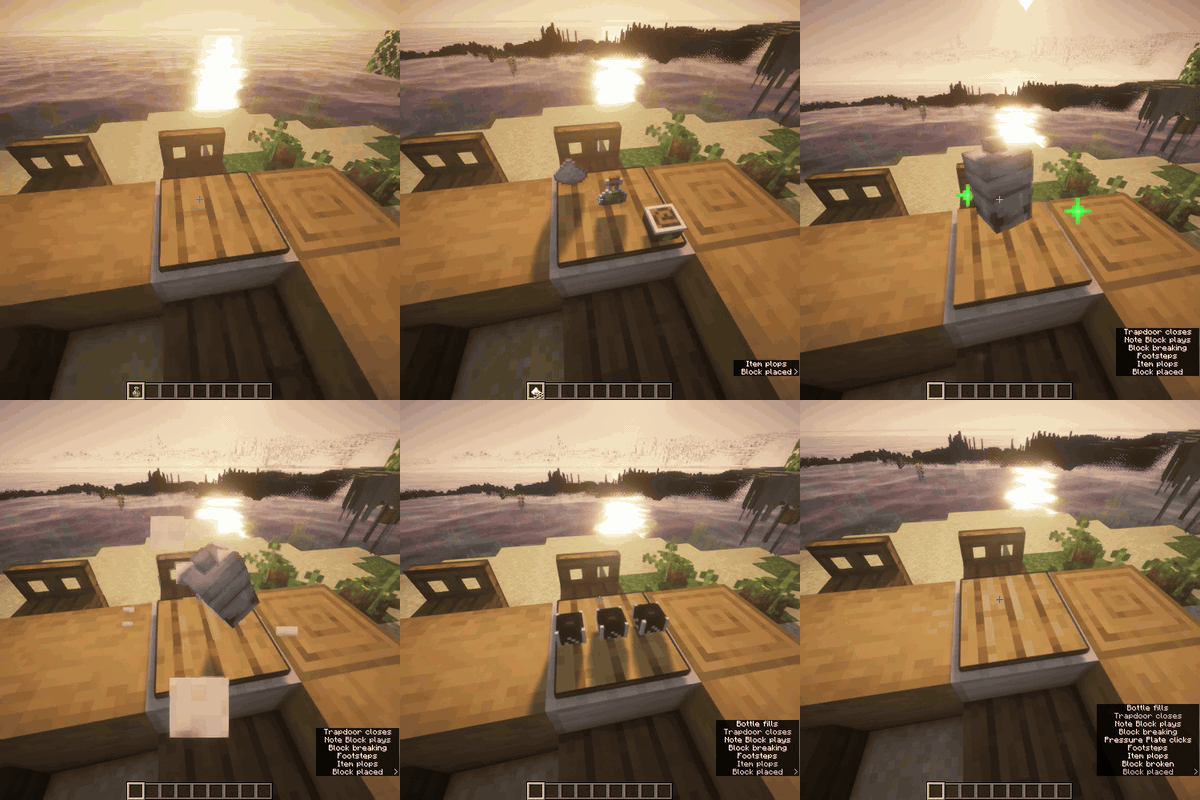
Build and shake
- Place any wooden pressure plate on an Iron Block.
- Find the drink in
/hland right-click the table with its exact ingredients. Extra ingredients do not match. - Right-click with an empty hand to start the eight-second shaker cycle.
- Left-click to collect the finished drinks. Left-clicking before completion cancels the batch.
Finished cocktail recipes make three drinks, displayed in a row. Reusable liqueurs and infusions make one bottle. Bottled ingredients supply the recipe containers; follow the in-game recipe rather than adding an extra empty bottle. Other emptied containers return once.
A recipe to try
With Café installed, try an Espresso Martini. Roast the coffee and pull two Espressos. Use one with Rum and Sugar to make Coffee Liqueur, then shake that liqueur with Vodka, the second Espresso, Sugar and optional ice. The full guide gives the quantities and both spirit-production options.
Ingredients and optional addons
Use the Juicer for pure fruit juices. Compatible Distillery supplies genuine brewed spirits, with their actual strength carried into cocktails. Without Distillery, Mixology supplies standalone spirit recipes. Café adds the coffee-based recipes. The recipe browser shows the content available with the addons installed on your server.
Perfect-quality batches have special shaker motions. Recipes that accept ice can use Packed Ice or Blue Ice for a quality bonus; check the ingredient options in /hl.